
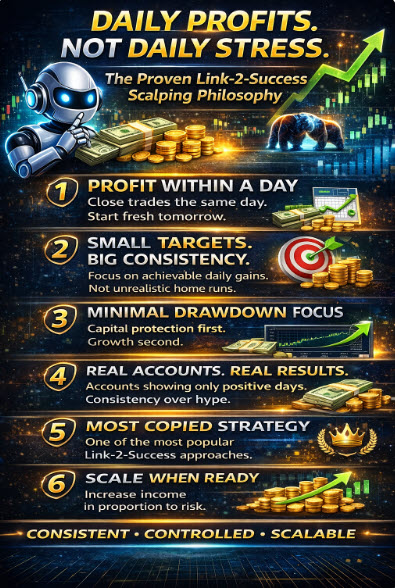
The recent popularity of an automated day-trading, scalping-style technique in the Link to Success service has highlighted the need for trading methods that help traders achieve profitability within a day. With this technique, maximising income is not the main objective. The objective is to set small, achievable targets with minimal drawdown. This is often a paradigm shift for many traders, who aim to maximise gains.
Here is an example of a recent trading account started in December that only had positive days
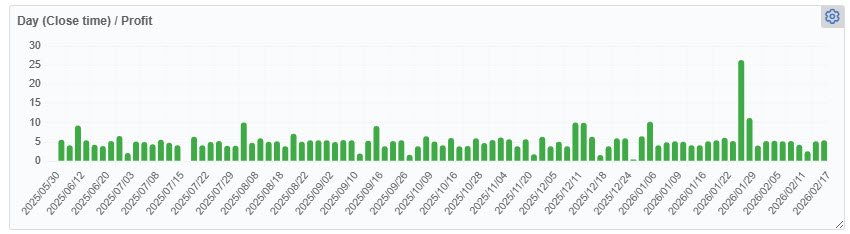
This technique has enabled considerable success for traders copying trades from the Link-2-Success service. Please view this playlist for videos showing the success of making good profits every few days: https://www.youtube.com/playlist?list=PLda98agBeOd4_PEY9v2dKAPIkoxDT7yz1
What Testers are Saying:
“This is exactly what I was looking for”
“I'm loving it ....!”
” No losing trades"
“Had some Great results"
“100% success on 7 test accounts!”
"Day 2 and the magic continues"
"Starting trading days with a clean slate is psychologically very good
"truly remarkable"
"A really great feeling for any trader"
"Great consistency with low drawdowns - the trader's dream"
"This EA and its strategy will be a dream machine for Prop Trading!!"
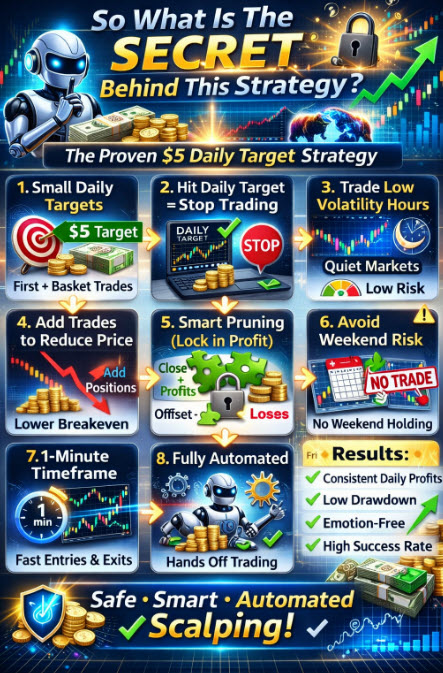
So what is the SECRET behind this strategy?
- The strategy has small targets for its first and basket trades. The base strategy has a small daily target, such as $5.
- Trading stops (halts) once the daily target is achieved
- Trading occurs during the quietest times of day, when the instruments' volatility and trading volume are lowest.
- The Robot performs well with a very small entry window of 2 to 3 hours.
- 4 proprietary entry techniques that take a number of indicators and time frames into account.
- When trades start going negative, additional trades are opened in the same direction to lower the price level at which the daily targets will be achieved
- The key is that a pruning function is used to reduce risk by offsetting and closing positive trades with negative ones, yielding a positive result. This process may involve partial lot closing.
- Generally, the price difference setting should be 2 x the First trade TP to give the trade room to move
- Trading can be restricted on certain days, such as Fridays, to reduce the risk of carryover trades over the weekend.
- Swap fees are managed on Wednesdays, when brokers charge triple, there is a facility to trade only in the direction where traders will receive swap fees instead of being charged. This can be applied to other days.
- There is a guard against excessive spreads being charged if the spreads are higher than 50% of the Take Profit, no trade will be entered
- A very quick timeframe is used - the 1 minute timeframe
- The process is completely automated so there is no emotional involvement.
What our Testers say so far
“This is exactly what I was looking for”, “I'm loving it so far!”, ”no losing trades”, “Had some Great results”, “100% success on 7 test accounts!”
SETTINGS
ACCOUNT INFORMATION: Minimum account size of $1000, with at least 1:100 leverage for every strategy traded, should be used. This strategy is not US Broker-compatible because the pruning function does not comply with the FIFO requirements.
You can use the default settings for trading currencies or alternatively the Black Box settings. To see the settings used for the Black Box & the Daily Scalper versions, please use link:
Black Box & Initial Daly Scalper Settings
BELOW ARE LIVE TRADING RESULTS UPDATED EVERY 15 MINUTES.
Click on the result blocks to be taken to the results and SETTINGS.
Please note that FXBlue results are based on closed trades and ignore open trades
Please note that the settings used fot the Black Box and Live Accounts have been calibrated to produce 5% a month. You can increase the gains and the risk by increasing the lot sizing used
Copy Service link: ScalperBB5
BLACK BOX SETTINGS
Live account results
Please note that the settings used for the Black Box and Live Accounts have been calibrated to produce 5% a month. You can increase the gains and the risk by increasing the lot sizing used
GOLD SETTINGS
WARNING: +Please note that the results shown below are based on very short trading results. The settings are therefore unreliable, but are provided to show you the potential of trading GOLD using the DAILY SCALPER.
Please note that to trade Gold, you need a $10,000 account and 500:1 leverage
Also included are links to these accounts, which are available on the Exclusive Markets Copy Service. You will need a funded Exclusive Markets trading account to link to any of the accounts below. Create an Exclusive Market account using this link: COPY TRADING ACCOUNT
Please note that FXBlue results are based on closed trades and ignore open trades
Go from Worrying about your trades

COPY TRADE OPTION: The simple solution
Together with our Broker Exclusive Markets, we can provide you with a service that allows you to copy trades from any of the above accounts for as little as $300. This is a minimum, but there is no maximum. You simply open a trading account with Exclusive Markets, link to any of the accounts above individually, and any trades made by the accounts will be copied into your account.
For more information: COPY TRADE SERVICE
Using this service means you don't have to own the Daily Trader Robot. You don't need a VPS to run the Robot. You don't even need to know much about trading.
To be confident about your trading

The Robot Settings Explained
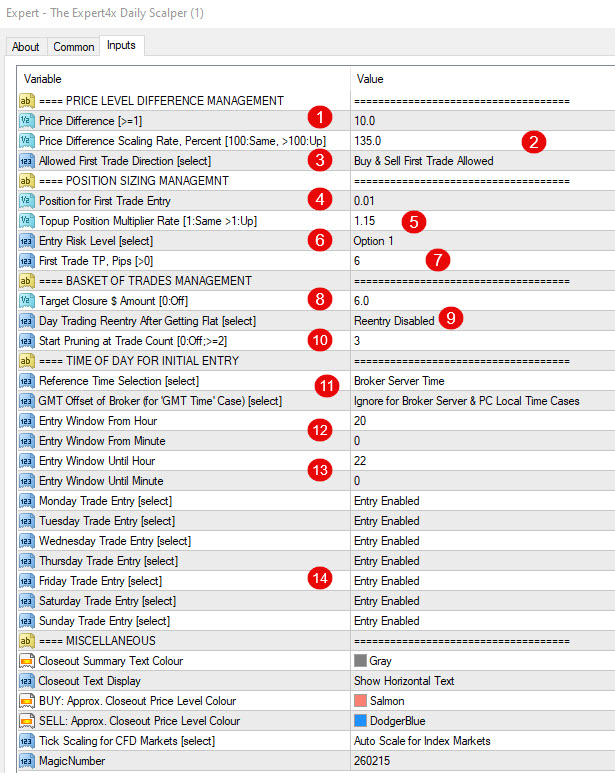
- The Robot uses price level to enter and exit trades (Similar to a grid system). This setting determines the difference between the 1st and 2nd trades.
- A trader can increase the distance between price levels by applying a percentage of each previous distance. So if the first price difference is 10 pips and this setting is 150%, the next price difference will be 15 pips
- This setting has a drop-down. The default is” Buy&Sell Trade Allowed”, which applies most times. There could be, however, as an example, a time when the day trader will want to enter only into sells due to triple swap fees charged by the broker on Wednesdays for buy trades.

- Enter the position for the first trade. It is good to start with a low number and then increase it considerably as you gain confidence
- The position size for the 1st trade can be increased with each subsequent transaction if you wish. This effect may be due to rounding limitations.
- The entry risk setting offers 4 options in the dropdown. 1 can be regarded as the highest risk and 4 the lowest.

7. The first trade Take Profit in pips can be set here
8. The Target for a basket of trades can be set here in $. A basket of trades happens when there are 2 or more trades open at a time
9. The strategy is designed so that when the 1st trade of the day, or a basket of trades, is closed, the daily trading target is reached, and therefore further trading for that day is not required. Re-entry disabled prevents further trading for that day.
10. Pruning is a major risk management function. When there are many open trades, pruning looks for 2 trades that can be closed, in whole or in part, at a small profit. So it might close a $ 3 gain trade with a $2 loss to reduce the number of lots used and simplify the basket of opening trades. This setting tells the Robot after how many open trades, pruning should start applying.
11. There are 3 options for this setting. It is best to use your own broker's server time, so what you see on your charts applies.
12. The entry time(in hours and minutes) for the 1st trade ONLY should be set here. Additional top-up and pruning trades can occur outside that time.
13. The Robot will stop opening 1st trades after the time (Hours and minutes) specified here.
14. The day of the week when trading can occur is specified here
Activate Swap fee Management here

Swap fees to Target

New Swap Fee Settings Added
Swap fees apply when entering trades that are likely to go over the Broker's daily close-off (normally 24H00). That is the time when Swap Fees are either charged or credited to open trades.
The first setting asks the trader if they want to apply Swap Fee Management or Not
The second setting allows the trader to specify which trades are affected when Swap Fee Management is selected. The choices are whether to apply Swap Feee Management to all trades made by the Robot or only to days when the Broker will charge triple swap fees.
How the management works is that when any of the above options are selected, the Robot will only allow trades where the Swap Fees are positive (Receive swap fees)

Setting change required to make the Daily Scalper US compliant:
Do not use pruning. This increases the risk fractionally but should not impact overall results
The EA will automatically close basket trades in FIFO order from now on
STARTER SETTINGS
WHEN IN DOUBT, USE THE DEFAULT SETTINGS ON the 1 MINUTE CHART OF THE USDCHF, EURUSD, USDGBP, EURGBP, AND OTHER LOW VOLATILITY CURRENCIES AND ENTER AT THE END OF THE US TRADING SESSION (21HOO GMT) USING AN ACCOUNT OF $1,000 and leverage of at least 1:100 for every currency/strategy traded.
A BLACK BOX VERSION
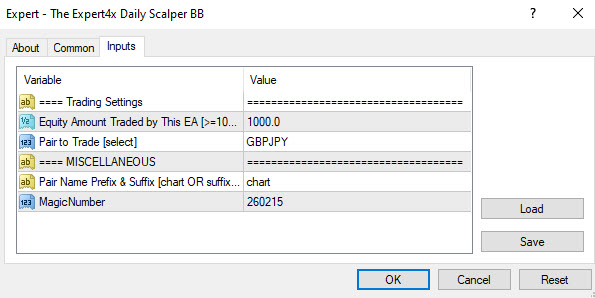
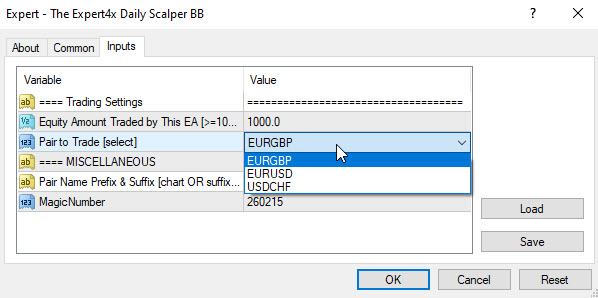
A Black-Box version of the EA i snow available. This version is meant for traders who don't want to constantly worry about or spend time finding the perfect settings. With the Black Box version of the Daily Scalper, traders will only need to tell the Robot which account size to use and which currency to trade. After that, the EA will handle their trading.
The Black Box version aims to generate trades that hit the daily targets consistently, without the user having to worry about a thing. The Monthly return is expected to be +/- 5%.
The Black Box and the Full settings version are sold together so that the trader can decide which one to use
Please note that you need a minimum account balance of $1 000 with a leverage of 1:100 for each strategy you trade using the BlackBox versions of the Daily Scalper.
As Always, you need to demo trade the Daily Scalper and the Black Box for a few weeks before trading on live accounts.


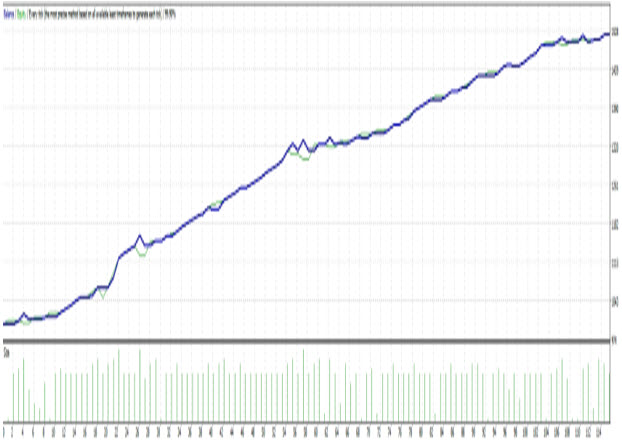
Start producing Equity Charts like these with minimal Drawdowns and Daily success
PURCHASE
YOUR EXPERT4X DAILY SCALPER and BLACK BOX HERE

When purchasing the Daily Scalper Robots, you will receive MT4 and MT5 downloadable versions of the full version and the BlackBox versions. You will be licensed to use those versions as often as you like, on as many accounts as you like, as long as they are not used on more than 2 computers at the same time.
ACCOUNT INFORMATION: Minimum account size of $1000, with at least 1:100 leverage for every strategy traded, should be used. This strategy is not US Broker-compatible because the pruning function does not comply with the FIFO requirements.
As Always, you need to demo trade the Daily Scalper and the Black Box for a few weeks before trading on live accounts.
NEW CLIENTS - Purchase for $550. Please use the Buy Now button >
EXISTING CLIENTS - 50% discount price of $275 - purchase from EAFactory by signing into your EAFactory account
Purchase at EAFACTORY Website
YOUTUBE SUBSCRIBERS - 50% discount $275. Please use the YouTube button>
PREMIUM FORUM MEMBERS - 60% discount $220. Please log in to the Paid Forum using this link to claim your discount. Click on the button on the right, and then choose 60% off under Benefit 7 of the forum.
Click Here: FORUM
PLEASE NOTE:- We do not have Telegram, WhatsApp or any other messaging app. We have 2 Forums which are used for discussion and messaging: Free Expert4x Forum and Premium Expert4x Forum
