MENU
-
Overview of the Copy Service
-
Reviewing Linkable accounts before you join the Exclusive Markets Copy Service
-
Opening an Account for the Copy Service
-
Tips for selecting copy accounts
-
Linking your Trading account to the Copy Accounts
-
Managing your Copied Accounts
-
Frequently Asked Questions

HOW TO ENJOY THE EXPERT4X EXCLUSIVE MARKETS COPY SERVICE
(A Step-by-Step procedure manual)
1) OVERVIEW OF THE COPY SERVICE
Traders with a good track record list their Exclusive Market accounts in the Exclusive Markets Copy Service. Clients/Investors can then link their accounts to those accounts and copy the trader trades into their own Exclusive Market trading accounts. Clients/Investors will pay the Traders a performance fee (Normally 18%) with is a share of positive gains made during a specified period (Normally a week)
Clients/Investors have full control and flexibility about this fully automated process – they can select, from a long list of accounts, which accounts they want to follow and switch between them from time to time. They can manage the linking lots sizing to the size of your account, the Lot size multipliers, use Fix lot settings, and even apply their own stops and targets to trades as if those trades were their own.
The main advantages are:
-
Reduced slippage as both accounts reside on the same server (Please note minor slippage is still possible).
-
No VPS or continuous internet connection required, as the receiving account is on the broker's server.
-
No monthly fee – replaced by a weekly performance fee of 18%, paid only when your account is profitable.
-
Extremely easy joining process involving a few clicks.
-
For the copying service, you have full control with options like a) Linking lots sizing to the size of your account, b) Fully automated (Set and forget), c) Lot size multipliers, d) Fix lot settings. Plus, you can apply your own stops and targets to trades as if they are your own.
-
For the copy service, you can create your own hand-picked portfolio accounts to create a lower-risk portfolio.
-
The minimum account size to follow a 1-cent account can be $10 (1000 cents). Accounts that trade standard accounts require a minimum of $1000. There is currently a 30% bonus on new $1000 standard accounts.
2) REVIEWING LINKABLE ACCOUNTS BEFORE YOU JOIN
The service is best described on this page:
copy-trading
This activity is important as you need to decide which type of account to open. When you reach this section below, enter "Expert4x" into the search facility
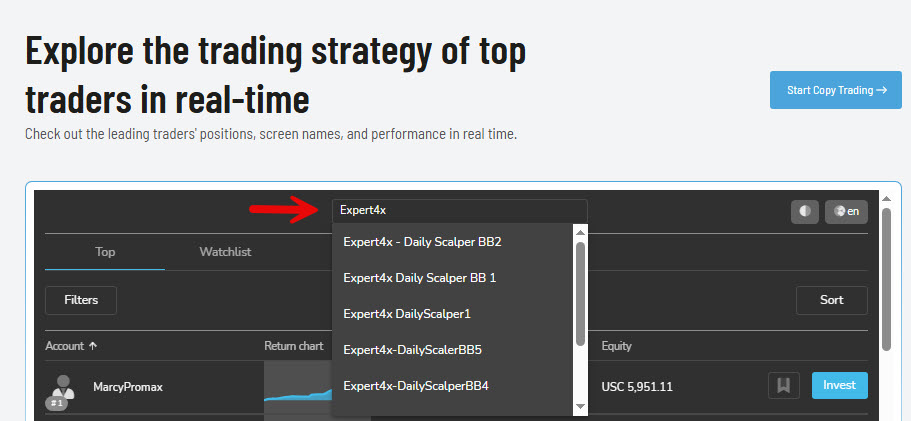
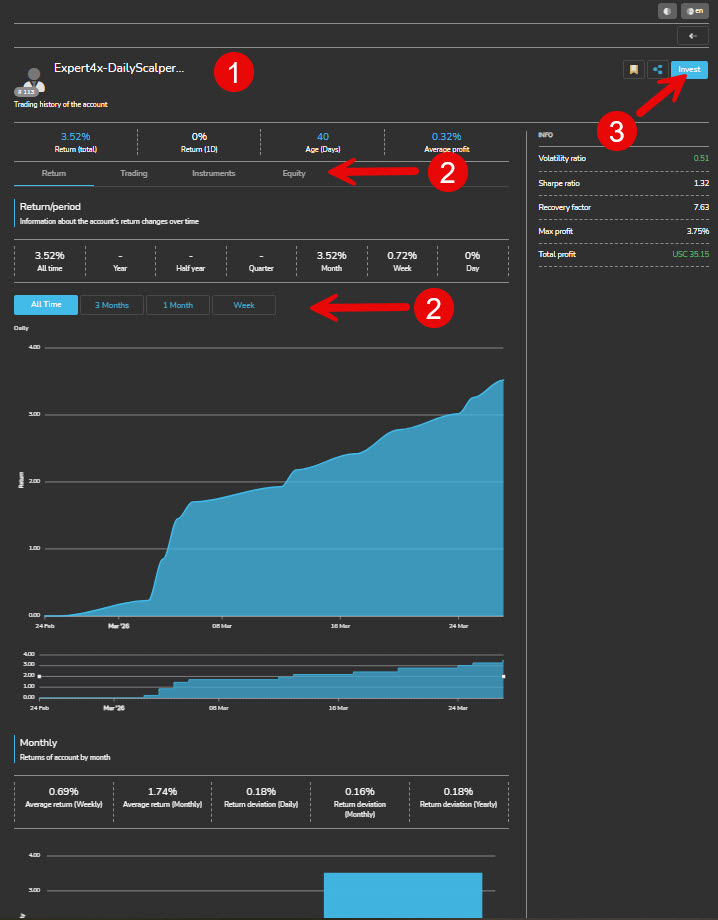
You will be presented with a trading analysis of the account (see below) . Study the analysis along with the information on this page to make decisions about which accounts to follow.
Make a note of those accounts as the next step is to open a trading account
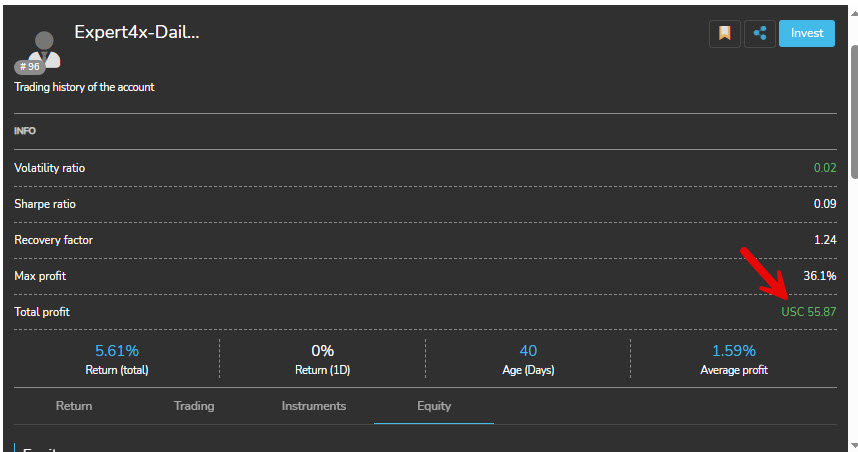
Please note the arrow in the image above. The USC shows that this is a cent account. Only cent accounts can follow cent accounts. So when there is no C (US), then it is likely that a Standard Account has been used.
This is important information as you will need to decide which type of account to open in the next step. Most clients/Investors open both types of accounts. There is currently a 30% bonus on new $1000 standard accounts.
3) OPENING AN ACCOUNT FOR THE COPY SERVICE
This is the easy part because Expert4x has an extremely helpful Account manager (Chris) who can streamline and assist with all your account matters (When Needed). If you follow the procedure, you may not need his assistance.
The first step is the important step. You need to link your account to Expert4x and its Account Manager in Exclusive Markets
In Order to do this, use the links below
Open a Cent Trading Account: CENT ACCOUNT
Open a Standard Trading Account: STANDARD ACCOUNT
(Standard accounts currently offer a 30% bonus)
The type of account you need depends on the trader you plan to follow. That is determined in the previous phase. It is best if you open both account types.
After clicking the links above, please follow the step-by-step process.
Please note that Exclusive Markets allows only 5 accounts of a given type per Client. So it's better to follow all Copy Trader Accounts using 1 account than to try to have an account per copy account trader.

4) SELECTING ACCOUNTS TO COPY
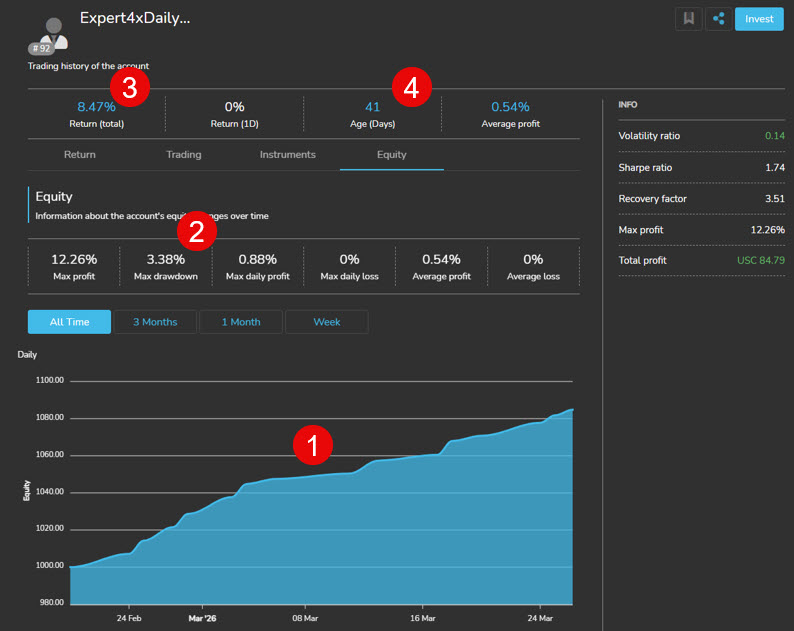
Quick (High-level) ways of selecting robust trading accounts to copy:
-
The smoothness of the equity chart. This chart is shown in the list of linkable accounts, so it is easy and quick to spot accounts with smooth equity growth charts
-
The maximum drawdown is a major indicator of risk. The higher the %, the higher the risk. This % is also an indicator of how suitable the strategy is for Prop Trading and for lot multiplication.
-
The return is important. Sometimes a low return with a low risk (Max Drawdown) is safer in the long run. A 5% monthly return equals a 60% annual return.
-
The age of the account makes the statistics more reliable
The 4 points above are sufficient to create a shortlist for further evaluation.
The details in the image below were obtained by clicking on the name of the account
5) LINKING YOUR ACCOUNT TO COPY TRADER ACCOUNTS
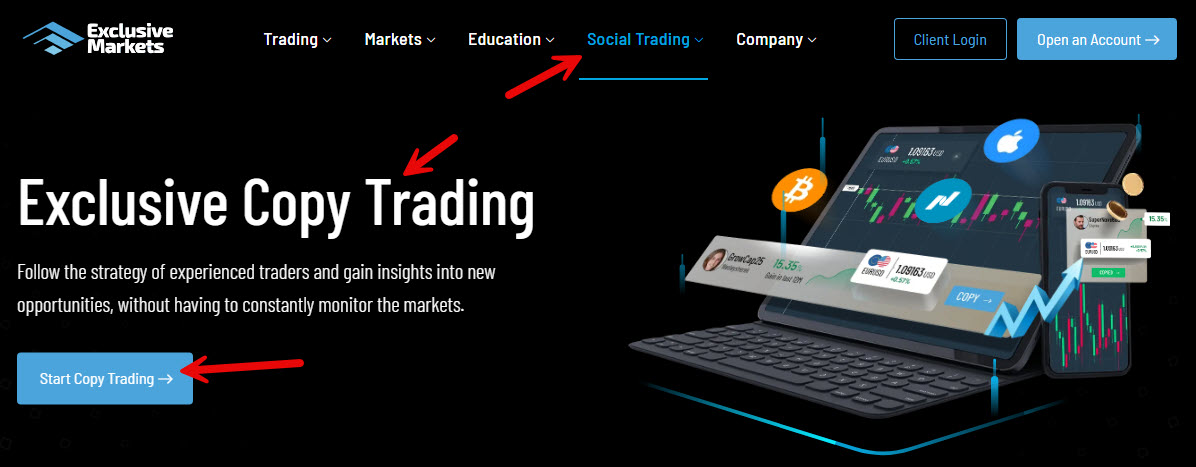
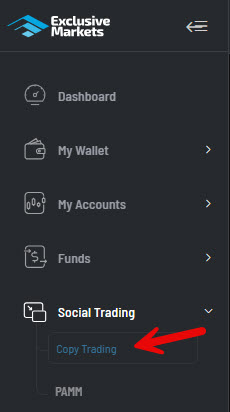
After logging into your Exclusive Market account on the Exclusive Markets website click on "Copy Trading" under the Social Trading option on the menu
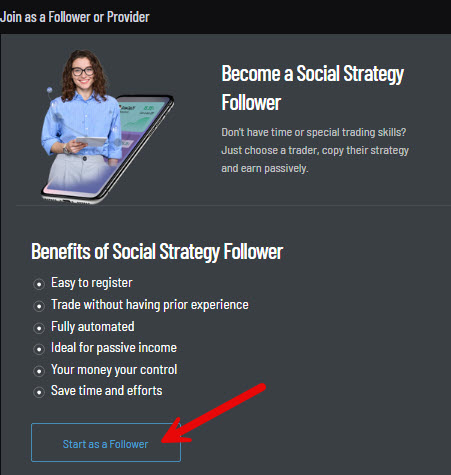
Click on the "Start as a Follower" Link
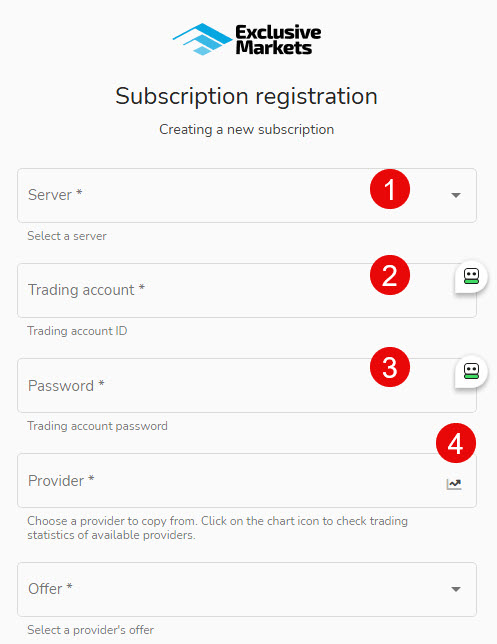
Complete the registration by:
-
Selecting from MetaTrader 4 or MetaTrader 5 from the dropdown choices.
-
Enter the account number of the funded account you are going to use for your copy accounts
-
Enter the password for that account
-
Click on the chart icon to be taken to the accounts you want to link to
-
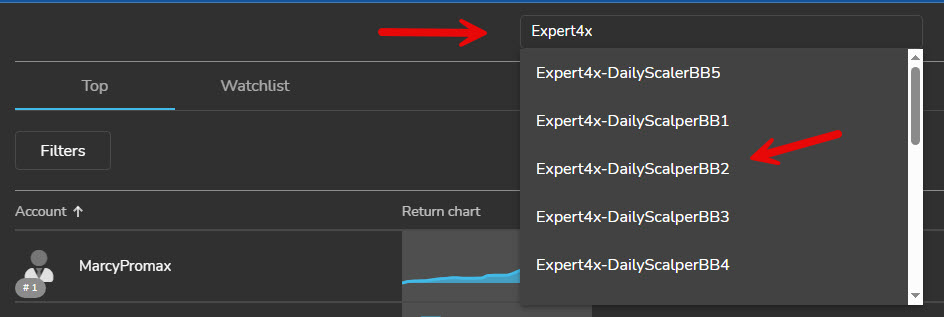
Enter "Expert4x" into the search field to see a list of accounts you can link to
-
Click on the account you want to link to
-
You will be shown a page with trading statistics about the copy account.
-
Study all the details provided and click on all the tab choices provided.
-
When Happy, click on the "Invest" Button
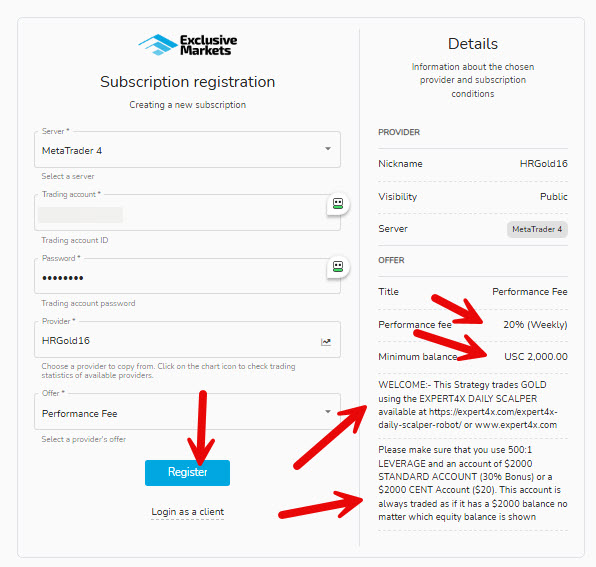
You will be taken to a subscription registration page. When you link your copy account, you are effectively subscribing to the account.
Complete the information again, and this time, the provider information is shown.
When you have completed the information, click on the "Register" button
Also shown in the Performance fee and minimum account balance
YOUR SUBSCRIPTION PROFILE
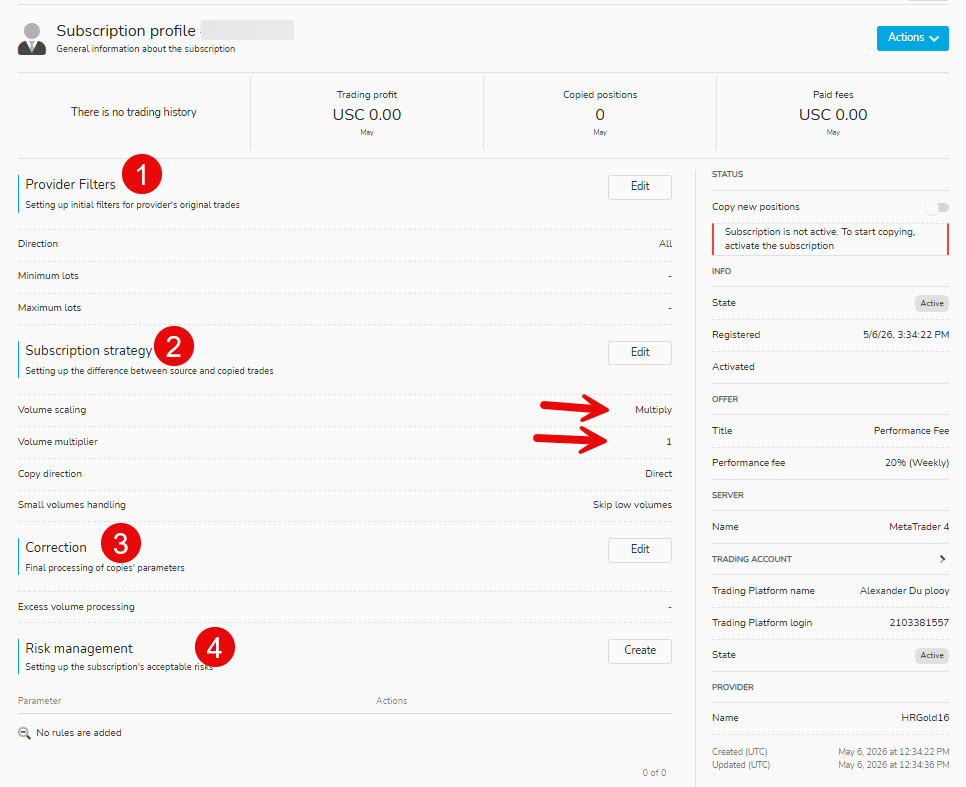
This is a very important page, as here you tell the Broker how you want your copy subscription managed. Here you can manage your personal risk exposure.
Let's go through the sections one by one
1. PROVIDER FILTERS
Here you can tell the broker to allow only buy, only sell, or all transactions. You can also specify the minimum and maximum lots to be processed on your account.
2. Subscription Strategies
Read the options very carefully and select the ones you want to use. It is recommended that you use the Multiplier option with a 1 multiplier
Some notes to the options.
AutoScale: This will automatically increase your lot sizing as your account size increases. Consider that if you are going to link many copy accounts to your one trading account, it could inflate lot sizing. It might be better to use the "multiply" or "Fixed approach"
Compared value: You can choose between equity and accout balance. In general it is better to use equity as that takes open trades into account.
Ratio Multiplier. It is best to use 1 initially. Increase this value if you want to potentially increase income and risk.
Copy Direction: You are in a position to reverse the direction of trade.
Small volume handling. If your equity declines, lot-size calculations can fall below the broker's minimum. You can round up or miss the trades.
After you have completed all the above instructions, click on "Actions"
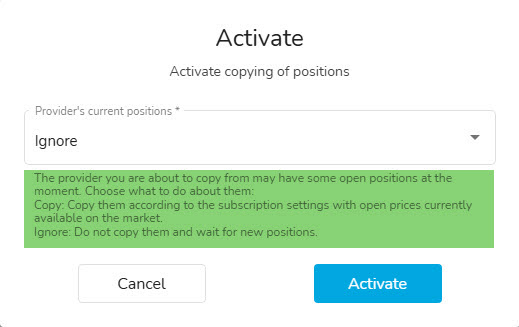
ALMOST THERE - ONE MORE INSTRUCTION
If the account you are about to join has open trades, you can IGNORE the or OPEN the same trades at the current prices. This is a personal decision, but it can result in a profit boost. Is there a risk that many negative deals will recover?
6) MANAGING YOUR COPIED ACCOUNTS
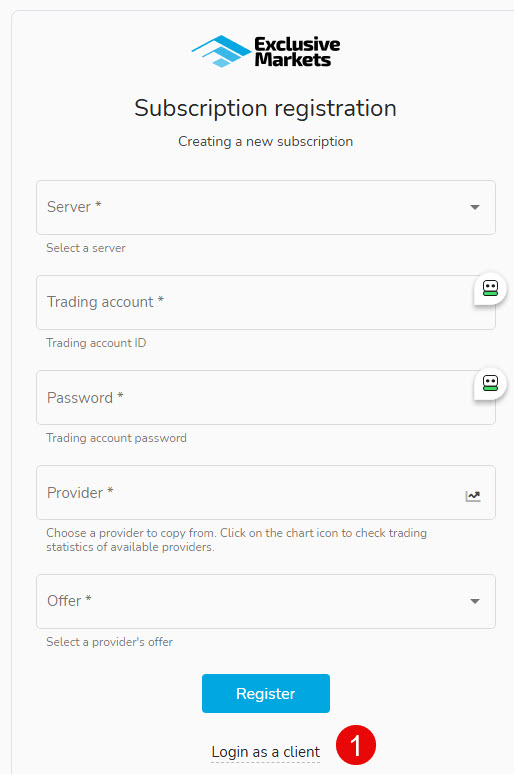
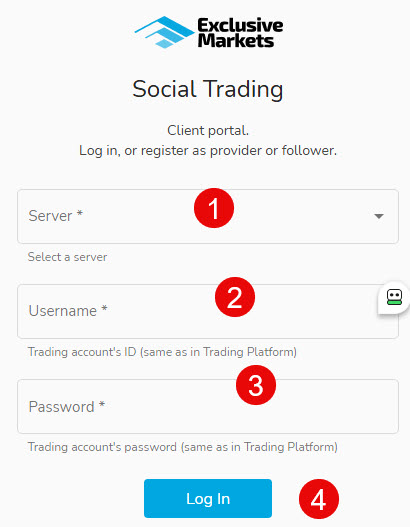
You will be taken to the account used to copy accounts in the service.
-
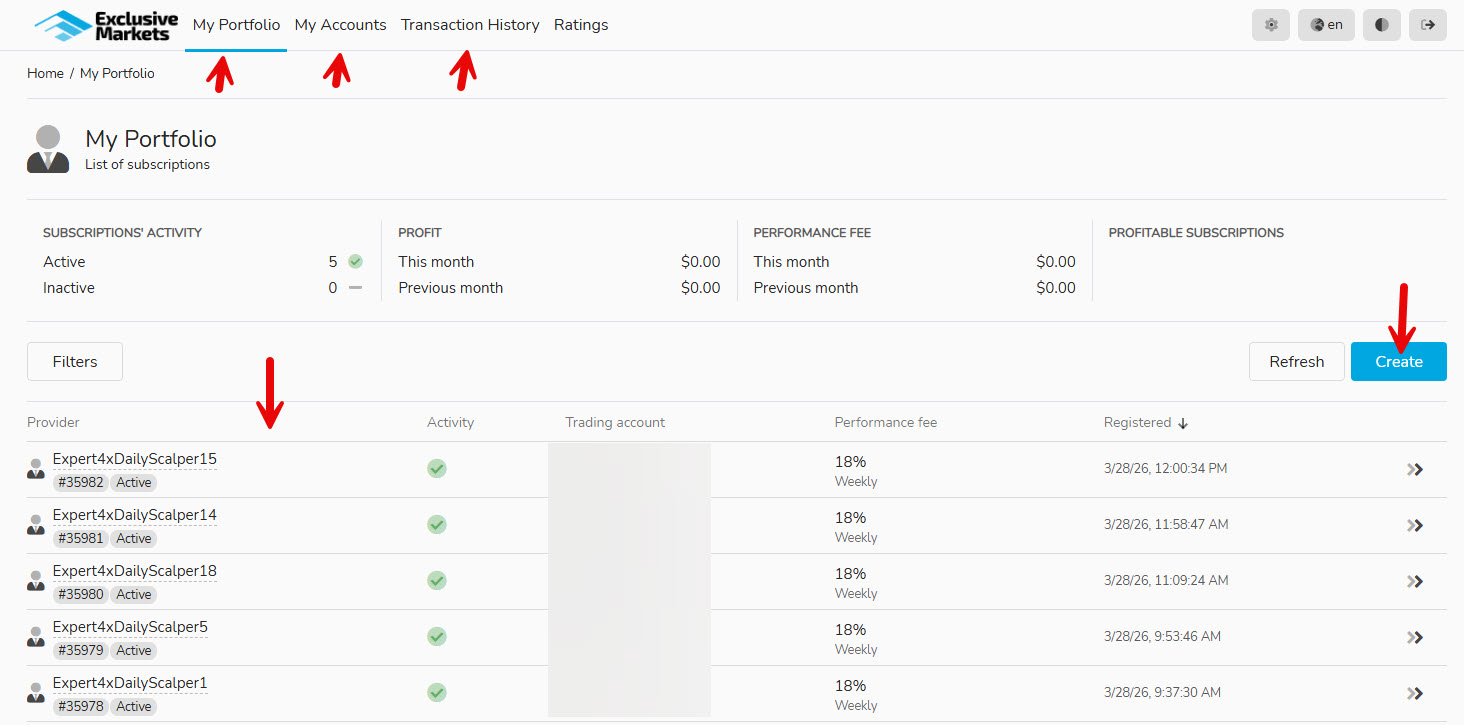
Use the main menu to view aspects of your account
-
In the "My Portfolio" you will see a list of accounts you have linked to.
-
By using the "Create" button, you can create new subscriptions
-
By clicking on the provider name in the subscription list, you can make changes to your subscription rules
7) QUESTIONS AND ANSWERS
Please note that it is an Expert4x webpage for its clients. The service is actually provided by Exclusive Markets. Please use the chat facility they have on their website or the contact us details to find answers to any questions related to this service.