
Grid Trading Robot Options
1) the Simple Grid Trader Gen 2,
2) the Simple Grid Trader Gen 3,
3) the Simple Grid Trader Gen 4.
EXPLAINED

The Grid Trader Evolution
It all started with this video that has had 360 000 views by traders who have an interest in Grid Trading
Although Expert4x has an advanced Grid Trading Robot (The GTM) that has been developed over the last 12 years, a need for a simpler Grid Trading system emerged . Video on the right shows the history of how the Simple Grid Trader evolved.
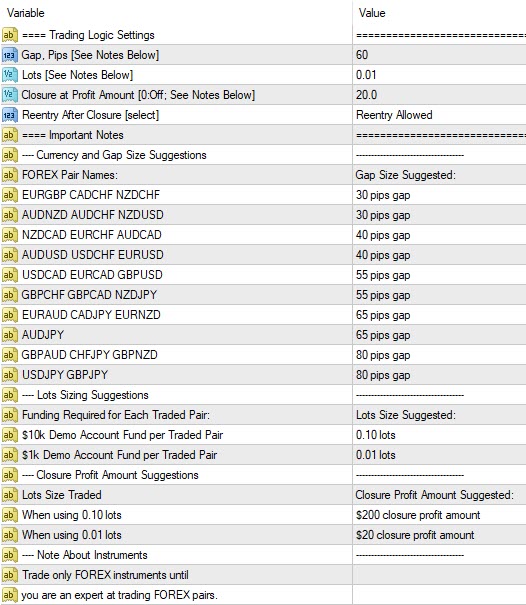
The Grid Trader Generation 2
The Creation the Simple Grid Trader Generation 2
The Simple Grid Trader Generation 2 was enhanced by adding the Zero Drawdown option.
How the Zero Drawdown setting works is that when the Equity improves by a certain dollar amount determined by the trader, it will close all trades thereby locking the profit in and also creating time where there is ZERO drawdown as there are no open trades. It will then stop trading or continue by starting all over again.
The Simple Grid Trader Generation 2
The chart below show the baskets of open trades being closed at a profit
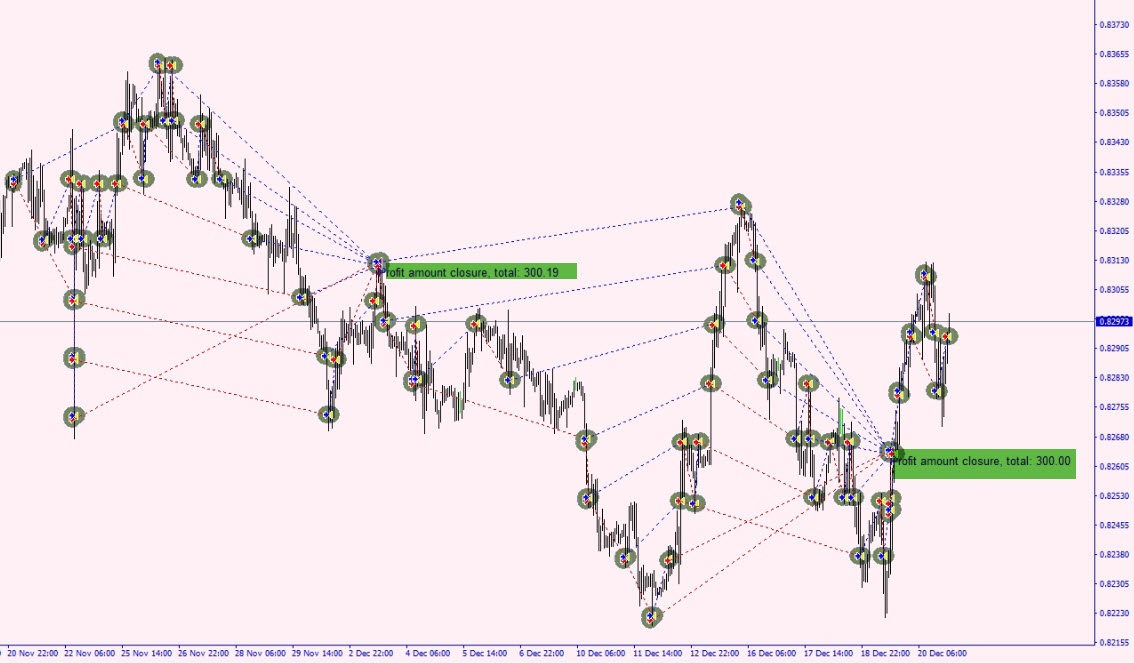

The video shows the Zero Drawdown setting (Called the "Closure at a Profit Amount" in the settings and the impact it has on trading results to reduce drawdowns
Grid Trader Generation 2
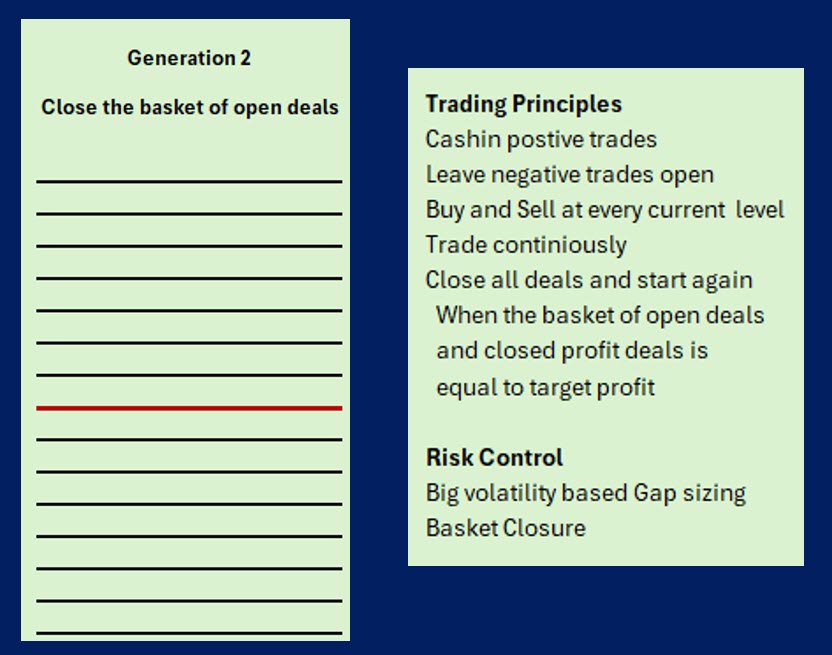
Easy Grid Trader Gen 2 Settings
-
Only 4 settings
-
Guidance on which settings to use
The Grid Trader Generation 3
The Creation of Generation 3
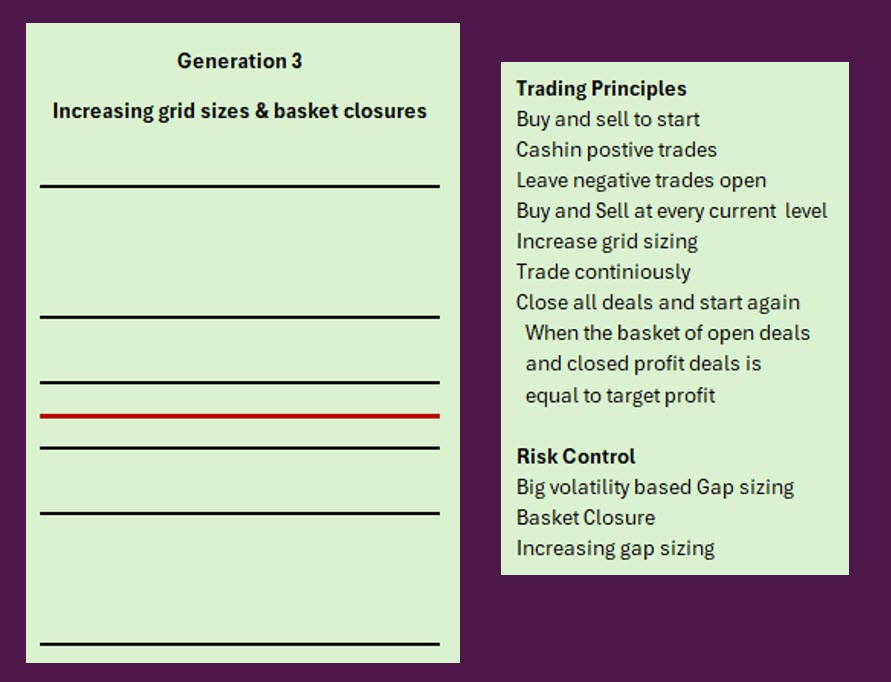
One of the risks of Grid trading is that the currency traded will start trending unexpectedly and start opening many open trades with negative balances. To reduce the impact of many open trades the option has been created to increase gap sizing on a continuous basis. The result is that gap sizing increases for each new gap and consequently there are fewer open trades
EXAMPLE:
No Gap scaling: 50, 50, 50, 50, 50, 50 = 6 open trades after 300 pip movement.
With Gap scaling of say 20%: 50, 60, 72, 86, 103 = 5 open trades after a 371 pip movement.
Grid Trader Generation 3
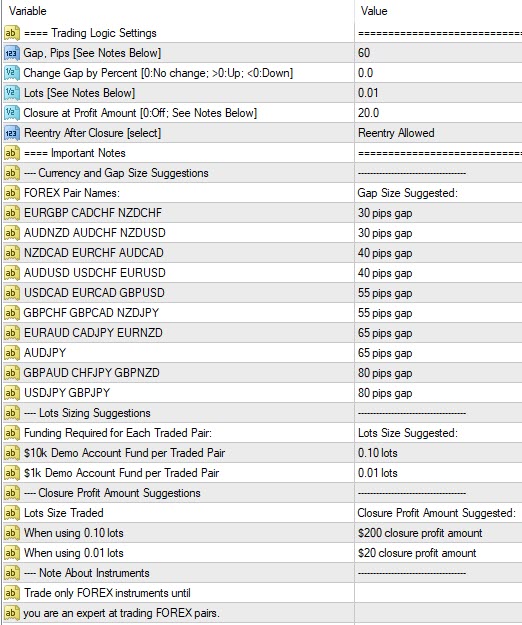
Easy Grid Trader Gen 3 Settings
-
Only 5 settings
-
Guidance on which settings to use
The Grid Trader Generation 4
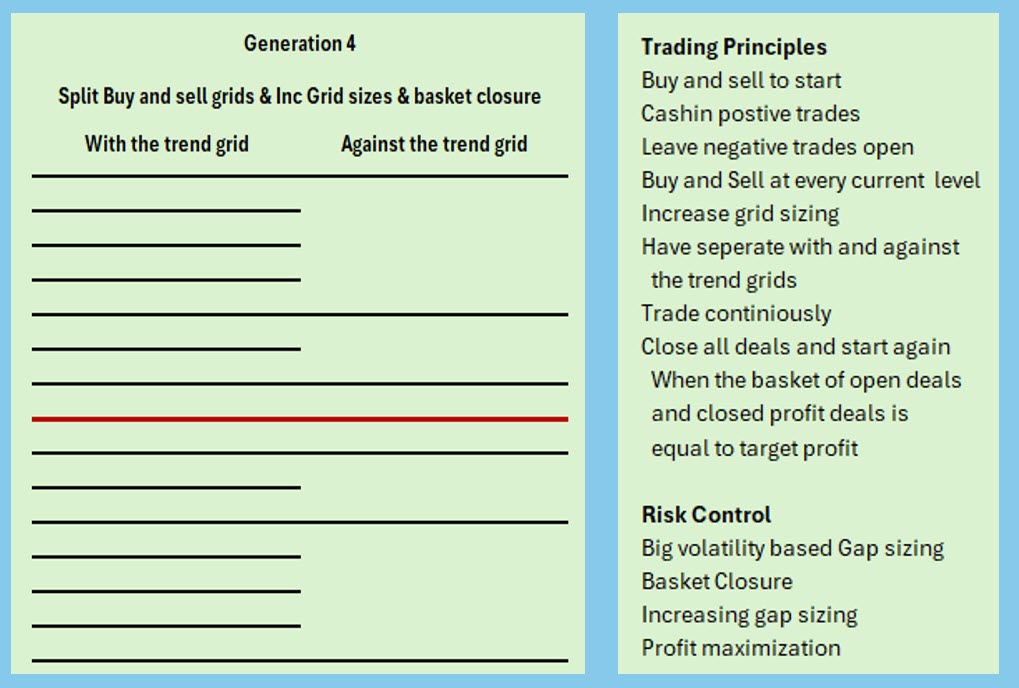
If both the With the trend and the against the trend legs of the grid would increase at the same rate it would result in fewer and fewer trades at the gap gaps for both would become very large. In order to avoid this an against the trend leg and a with the trend leg was created so that the with the trend leg would have smaller gap sizes and more chance of cashing in.
The "With the Trend" and "Against the Trend" legs concept
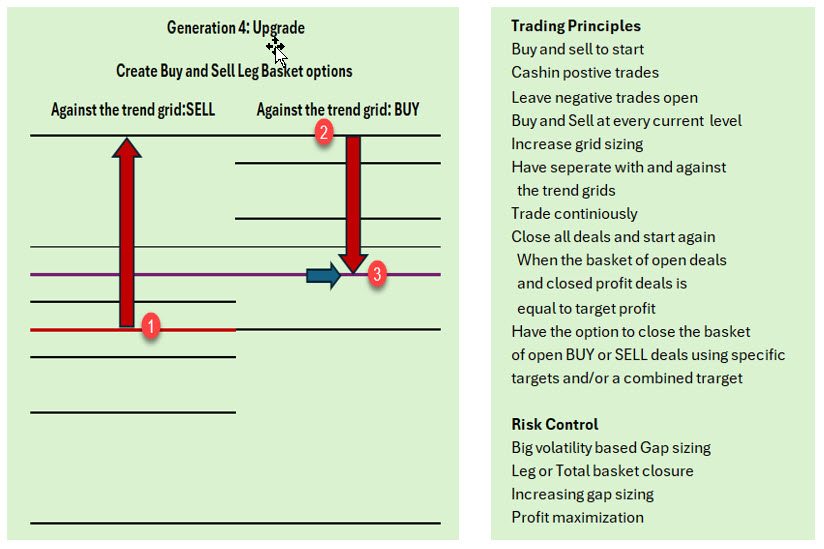
The above concept was further enhanced by adding the ability to have BASKET closures for the individual BUY / SELL legs as well as a BASKET closure of the Total of the 2 legs.
The diagram below shows why this was done. When trading starts as normal at point 1. Then the price trends to point 2 where the trend changes and reverses to point 3 in the diagram.
At this point (3) the buy leg that used to be the “with the trend” leg becomes the “against the trend” leg. At point 3 the SELL leg that was once negative is now at the at the level where it can be closed profitably at an individual leg target. This will leave BUY leg with a negative balance but the sell leg will start over with the smallest grid sizes. It will remove the risk of the price going sideways and it taking a log time to reach the Combined Basket target.
The options are:
1.To only use the individual SELL / BUY leg option where a target is set or individual leg s
2.To only use the combined option where the total both legs have to reach the target set.
3.Or you can use both options at once. The Robot will close the basket that reaches its target first.
In General using the BUY/SELL Basket closures will reduce drawdowns but will also reduce profitability. This will add more savety to Grid Trading.
The "BUY" and "SELL" legs Options
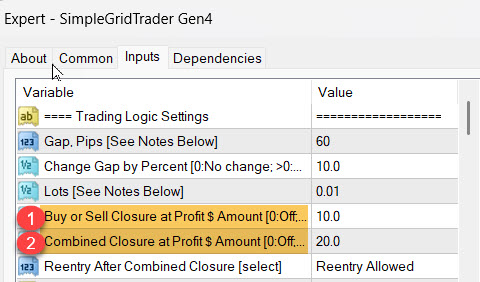
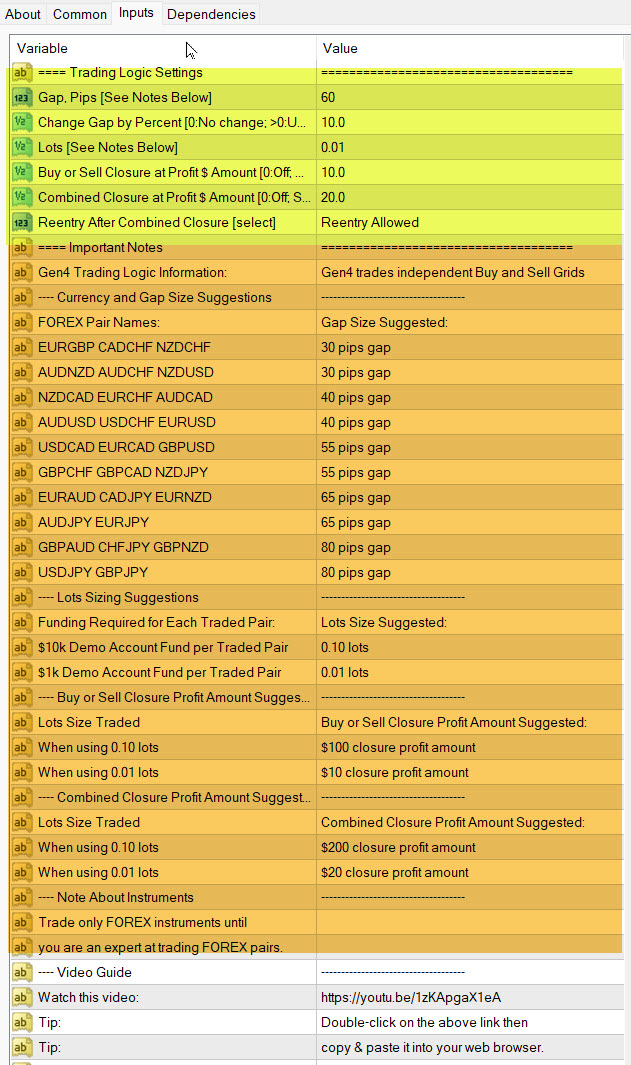
The settings input for the above options are shown in the total settings shown below.
-
Shows the $ value for closing either the SELL or BUY legs individually.
-
Shows the $ value for closing the combined totals of the BUY and SELL legs together
Enter 0 to switch any of the options off. You can select both at the same time and the Robot will close the deals that reach their target first
Easy Grid Trader Gen 4 Settings
-
Only 6 settings
-
Guidance provided on which settings to use
Please note: The with the trend and against the trend logic is built into the Robot and there are no settings required for that (The settings are the same as Generation 3)
The YELLOW section is the 6 setting input section
The ORANGE section is highlevel guidance on using the settings
For actual traded strategies please use this link: GRID STRATEGIES
The Grid Trader Series Summarized
Information about the Simple Grid Trader Generations.
(Click of the TABS below to see information about the various Grid Trader options)
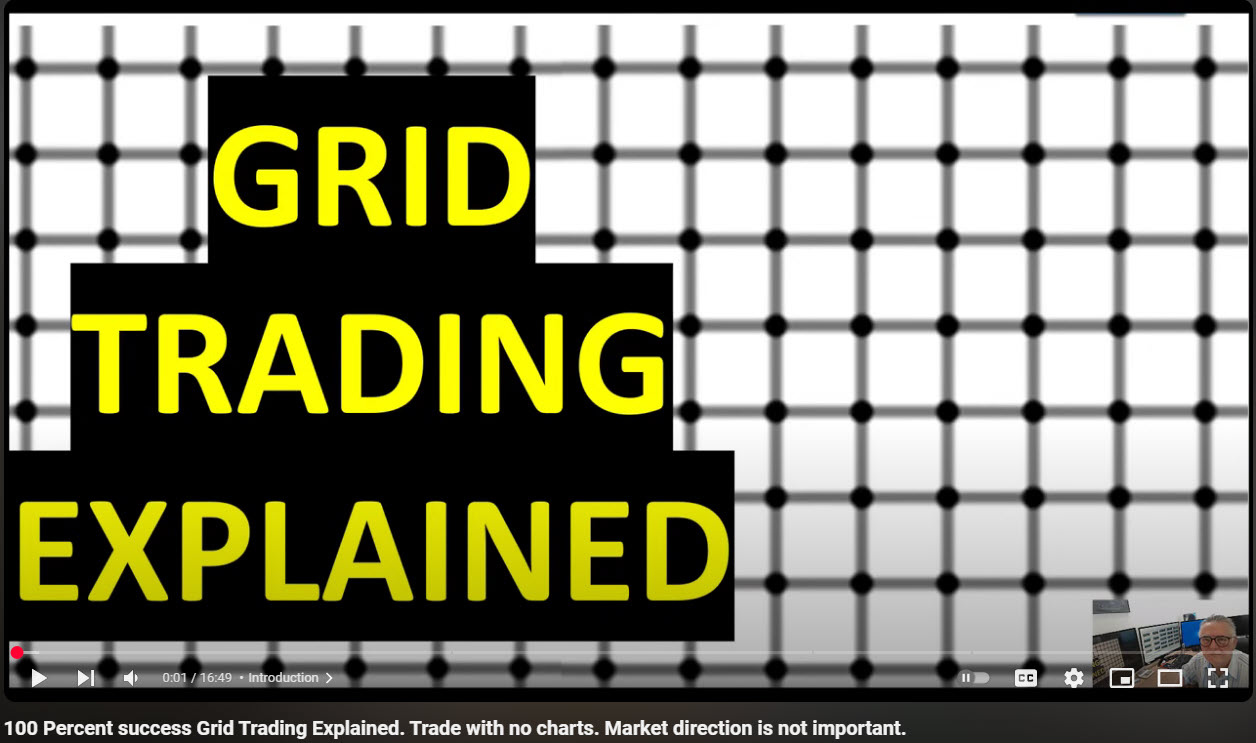
Grid Trading is very simple. The trader creates a grid on the chart. The grid levels are separated by a grid gap (Normally measure in pips). Using this structure a buy and a sell trade is entered at the first grid level. The rules are simple: Make sure there is a buy and a sell open at each level visited by the price so that a positive trade can be assured. Cashin or close any positive trade when the price reaches a grid price level. Continue trading leaving negative trades open. Money is made when the price revisits levels over and over again.
Please watch this video for more information: https://youtu.be/1zKApgaX1eA?si=cv-3H4fvHlFUPFan
For more information and videos about this option please use this link> GEN 2
Generation 3 has all the functionality of Generation 2 but has added functionality whereby the trader can increase the grid sizes by a percentage. The reason why this is important is that when the instrument traded starts trading it is a good option to increase grid sizes so that fewer trades are opened. This is another way of reducing the number of open trades in the grid.
The Simple Grid Trader Generation 2 has everything that the Simple Grid Trader has but the ability to prune open trades profitably has been added. Many negative open trades can run up overnight broker charges as well as consume margin. To avoid this open trades should ideally be kept to a minimum.
A function has been added that records the total of trades closed profitably since the last profitable single trade and compares that to the total of all open trades. When the total of cashed-in trades becomes higher than the total of open trade by the amount specified in the settings all trades are closed. The trader can instruct the Robot to either stop trading at that point or to start trading a new grid. This makes sure that all open trades are closed at effectively a net profit and the the number of open trades is reduced.
If both the With the trend and the against the trend legs of the grid would increase at the same rate it would result in fewer and fewer trades at the gap gaps for both would become very large. In order to avoid this an against the trend leg and a with the trend leg was created so that the with the trend leg would have smaller gap sizes and more chance of cashing in.
Further more 2 basket closures are available so the individual Buy/Sell baskets can be closed and/or the total baskets can be closed
This video puts the various generations of Grid Trader into perspective but also links them to our profit retriever type Robots which also use the grid system
Recent Grid Trader Trading Results
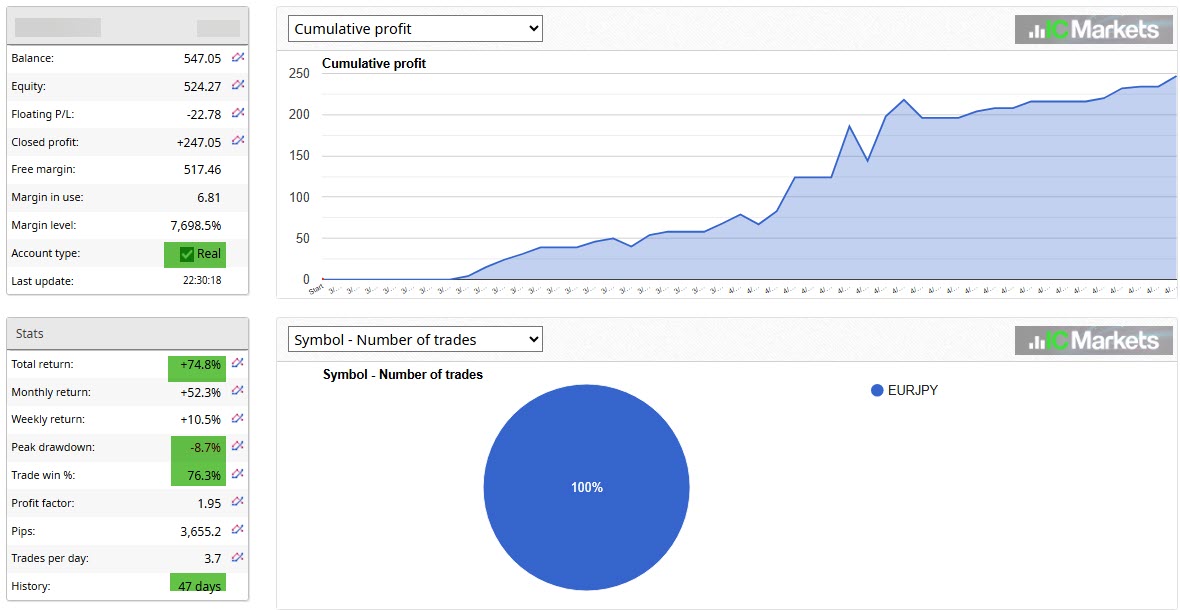
Recent results mainly traded by Generation 2 but changed to Generation 3 when it became available
$300 Real account that made a 74% return in only 47 days
A $300 account doubled in 57 Days
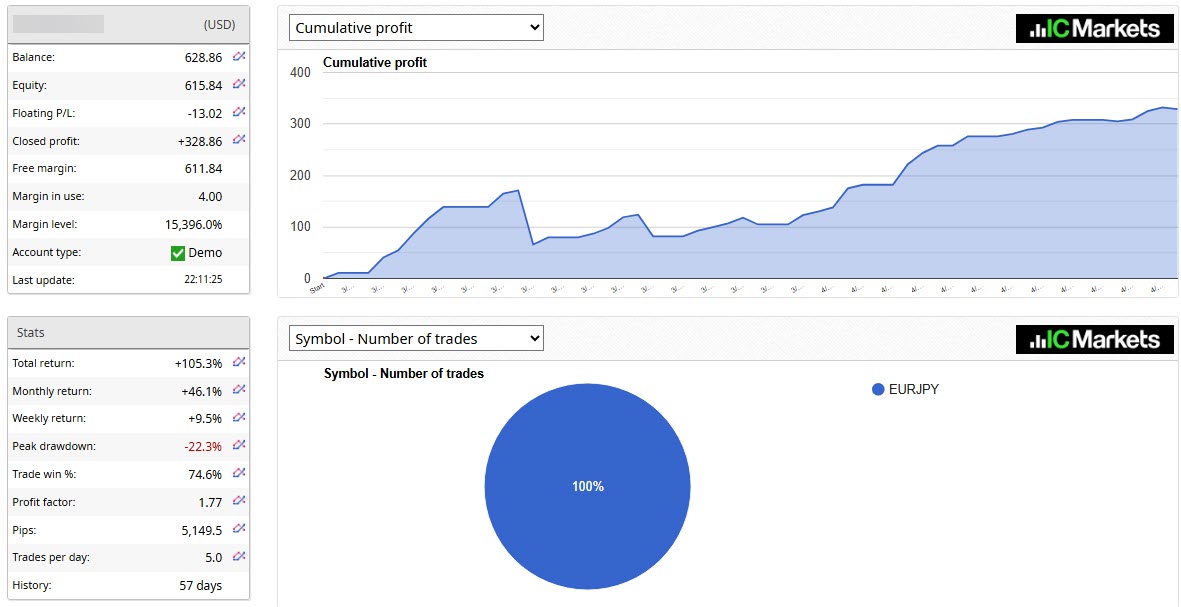
As you can see the Simple Grid Can be traded using a minimum of $300 using a 0.01 position size
ACTUAL TRADED RESULTS
(All Account Started with $300)
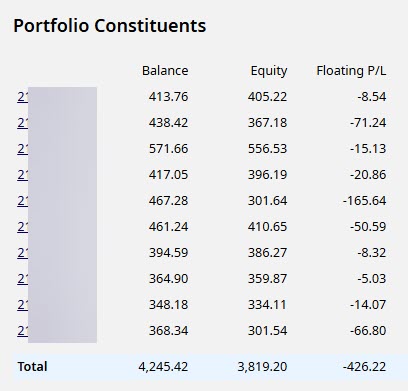
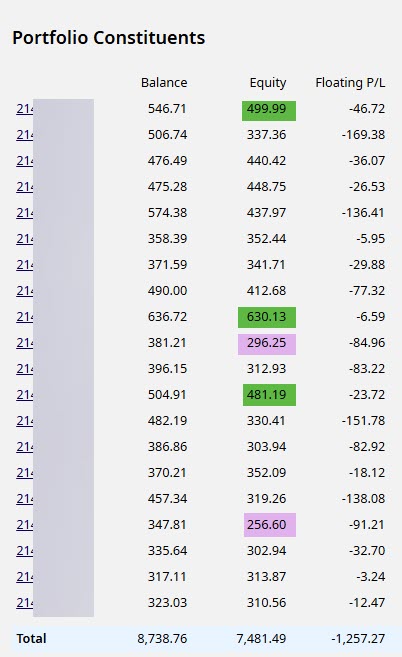
2 portfolios trading Generation 3 prior to the launch of generation 4. The 10 account portfolio is a LIVE PORTFOLIO and all accounts are positive. The 20 account portfolio is a DEMO PORTFOLIO
(These accounts trade the suggested settings on the setting input page)
THE GRID SYSTEM
Watch this video to see how your Grid Trading turns into a "Money Printing machine" that creates income on every move in the market after a few weeks. It also explains that initially there will be a drawdown while you are building you Magic Carpet for the first few weeks and how the Magic Carpet starts "PRINTING MONEY"
SETTINGS MADE SIMPLE !!
Finding settings for a Robot can be a big challenge . Because this is a SIMPLE grid Series we have made this SIMPLE.
Click on this link to see the best proven settings of 40 tested strategies that were traded on live and demo accounts. You SIMPLY need to copy the BEST ones to your Robot
Click here
SIMPLE GRID SETTINGS

IMPORTANCE OF PORTFOLIO TRADING
Do not put all your eggs in 1 basket. Nobody knows which currencies are going to perform well in the future. In order to spread your risk trade between 5 to 10 different strategies on demo accounts for a good length and then only select the best performing ones for live trading
Take advantage of 1 cent accounts if your trading accounts have limited capital. Open a live or a demo account using this link:-
Demo/Live Cent Account

PURCHASE HERE !
PLEASE NOTE THAT HEDGING TAKES PLACE SO GRID TRADING IS
NOT SUITABLE FOR US BROKER ACCOUNTS
BEAR THIS IN MIND: The Forex market changes from day to day, and past performance can not be guaranteed to repeat into the future. Past performance shown on any Expert4x page and in videos may use aggressive trading approaches and risk management to prove the potential of the Forex robot over long periods. Any favourable results are highly unlikely to be repeated in the future. You are responsible for setting up and testing the EA on your own broker demo accounts using many variations of currencies and time frames to ensure the EA works for you.
Options to use when purchasing a version of the
Simple Grid Trading Robot

IMPORTANT: We do NOT offer Refunds. Before you purchase, please read our "Sales Agreement" and "Risk Disclaimer" at the bottom of the page. By Clicking on any of the PayPal Buttons, you are agreeing to the "Sales Agreement".
The Simple Grid Trading Robot - Generation 2
-
Has 3 main settings: The grid size, Position sizing and the Zero Drawdown setting
-
Can be optimized
-
Can be traded on Live accounts
-
Offers enhanced drawdown management
-
Can be used as often as needed and continuously on up to 2 computers at the same time.
-
Available in MT4 and MT5
The Simple Grid Trading Robot - Generation 3
-
Has all the benefits and settings mentioned in the Simple Grid Trading Robot Generation 2 block
-
Has the added optional setting to increase the grid sizing by a percentage. This has risk reduction benefits.
The Simple Grid Trading Robot - Generation 4
-
Has all the benefits and settings mentioned in the Simple Grid Trading Robot Generation 3 block
-
Has the built in functionality to create a separate with the trend and a separate against the trend grid causing both to potentially have different grid sizes. This has increased income benefits.
Please use this PAYPAL Button. $160.00
Please use this PAYPAL Button. $220.00
Please use this PAYPAL Button. $300.00
Members of the Paid Premium Forex Forum will be able to purchase the above Robots at a 60% discount. Please log into the paid forum and click on "Discounts" in the main menu.
YouTube Subscribers get 50% Discount. YouTube Subscribers
ALREADY OWN A VERSION OF THE GRID TRADER ?
If you want to purchase a generation greater than what you own, you can do so from your EAFactory account on EAFactory' s Grid Gen 2 or Gen 3 download page for $60, $80 or $140 depending on the generation you own.
You will find the PayPal buttons on the download page on the EAFactory website you used to download your existing version.
